Best Products UK
In-depth review · 10 products ranked

Best USB Hubs of 2026

Last reviewed 19 May 2026 by Best Products UK Editorial Team

USB hub buying is mostly about matching the hub to the connection. Modern laptops (MacBook 2016+, most Windows ultrabooks) have USB-C only — you need a USB-C hub that adds back USB-A, HDMI, SD card slots and Ethernet. Older laptops with USB-A need traditional USB-A hubs. The trap is buying a USB-C hub for an older USB-A laptop or vice versa. This ranking is USB-C heavy because that's where the modern need sits.

BP
Best Products UK Editorial Team
Editorial team
Published 30 April 2026
7 min read
Advertisement. As an Amazon Associate, Best Products UK earns from qualifying purchases. This article contains affiliate links. If you buy a product through one of these links, we earn a commission from the retailer at no extra cost to you. Our ranked picks are made independently of these commercial arrangements — read how we rank and our full affiliate disclosure. Prices on Amazon change frequently — always click through to verify the current price before buying.
At a glance

The 3 picks worth skipping ahead for

How we tested

Best Products UK is a review aggregator, not a test lab. For this guide we read Amazon UK customer reviews focused on real data transfer speeds, HDMI compatibility with 4K monitors and Power Delivery (PD) pass-through reliability; cross-referenced against The Verge, Wirecutter and PCMag testing; and weighted long-term ownership signals (port wear, cable strain, heat under load) more heavily than first-day impressions. Powered hubs (separate plug) are essential for running external HDDs reliably; unpowered hubs (bus-powered) are fine for keyboards/mice/USB sticks but can drop drives under load.

Jump to a pick
Best Choice
01
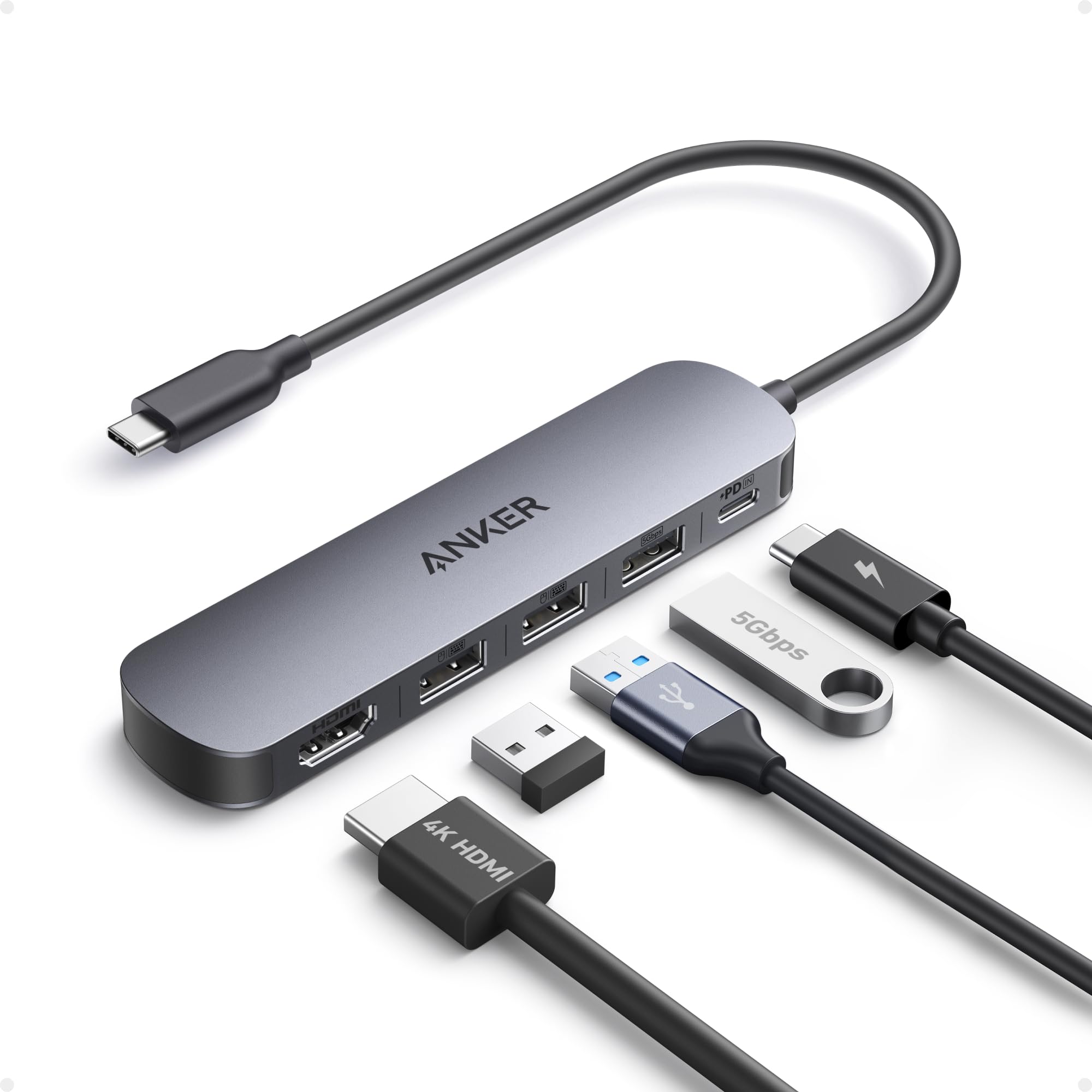
Anker USB-C Hub (Multi-Port Adapter)
Anker

USB-C Hub (Multi-Port Adapter)

9.5
/ 10
Exceptional

Anker's compact USB-C hub. Adds USB-A 3.0 ports, HDMI 4K output, SD card slot and USB-C PD pass-through (so you can charge the laptop through the hub). Anker's long-running USB-peripheral reliability makes this the safe default pick.

Why we love it
  • Anker brand reliability
  • USB-A + HDMI 4K + SD slot
  • USB-C PD pass-through for charging
  • Sub-£15 entry
Watch out for
  • Bus-powered (not for multiple HDDs)
  • Standard USB 3.0 (5 Gbps)
  • HDMI 4K typically capped at 30 Hz
Type
USB-C hub
Ports
USB-A 3.0 ×2-3, HDMI, SD, USB-C PD
Speed
USB 3.0 (5 Gbps)
Power
Bus-powered + PD pass-through
Brand
Anker
Premium Pick
02
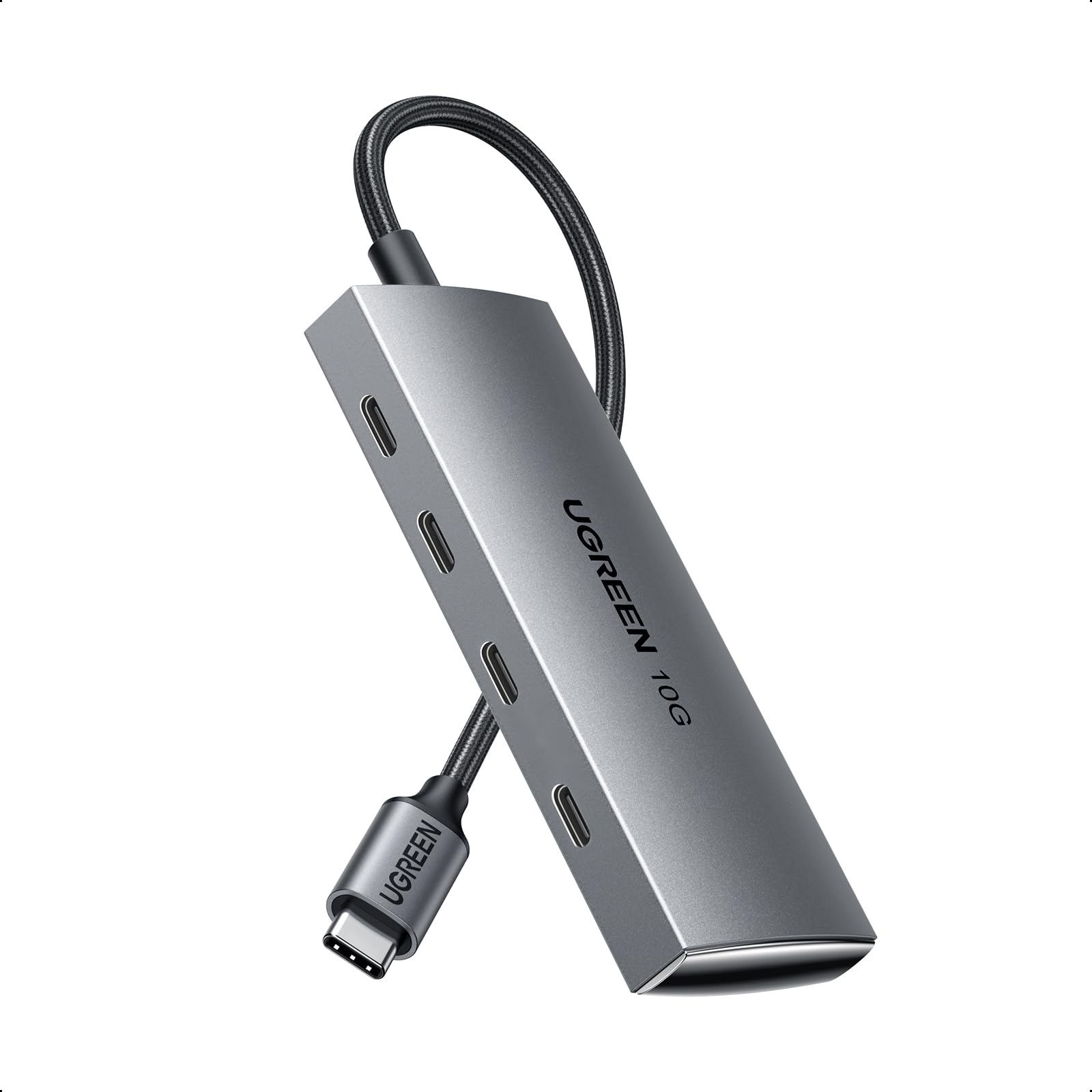
UGREEN USB-C Hub 10 Gbps (USB 3.2 Gen 2)
UGREEN

USB-C Hub 10 Gbps (USB 3.2 Gen 2)

9.3
/ 10
Excellent

UGREEN's 10 Gbps USB-C hub — twice the speed of standard USB 3.0 hubs. Matters when running external SSDs that can fully use the bandwidth. Includes USB-A and USB-C ports, HDMI 4K. UGREEN's UK presence in USB peripherals is strong.

Why we love it
  • USB 3.2 Gen 2 (10 Gbps)
  • Multiple USB-A + USB-C ports
  • HDMI 4K output
  • UGREEN reliable build
Watch out for
  • Premium for the speed tier
  • Bus-powered limits HDD use
  • 4K @ 60Hz only on some models — verify
Type
USB-C hub
Speed
USB 3.2 Gen 2 (10 Gbps)
Ports
USB-A + USB-C + HDMI
Power
Bus-powered
Brand
UGREEN
03
UGREEN USB-C Hub (Standard 5 Gbps)
UGREEN

USB-C Hub (Standard 5 Gbps)

8.9
/ 10
Very Good

UGREEN's standard USB-C hub at sub-£10. Adds USB-A 3.0 ports, HDMI, possibly SD/microSD. Functionally similar to Anker #1. Pick by current price.

Why we love it
  • Sub-£10 entry
  • USB-A 3.0 + HDMI + SD
  • UGREEN build quality
  • Compact design
Watch out for
  • USB 3.0 only (5 Gbps)
  • Bus-powered
  • No PD pass-through on base SKUs
Type
USB-C hub
Speed
USB 3.0 (5 Gbps)
Ports
USB-A, HDMI, SD
Brand
UGREEN
Price
Sub-£10
04
Anker USB-C Hub (7-in-1, PD Pass-Through)
Anker

USB-C Hub (7-in-1, PD Pass-Through)

8.6
/ 10
Very Good

Anker's expanded 7-in-1 USB-C hub. More ports than #1 — typically 2× USB-A, 2× USB-C, HDMI, SD, microSD. Slightly larger chassis. Right pick for users with many peripherals.

Why we love it
  • 7 ports (more than basic 4-in-1)
  • Multiple USB-A + USB-C
  • PD pass-through
  • Anker reliability
Watch out for
  • Larger physical chassis
  • Premium for 7-port
  • Bus-powered (HDD risk)
Type
USB-C hub 7-in-1
Ports
USB-A ×2, USB-C ×2, HDMI, SD, microSD
Speed
USB 3.0
PD pass-through
Yes
Brand
Anker
Best Value
05
UGREEN USB-C Hub (Mid-Tier Multiport)
UGREEN

USB-C Hub (Mid-Tier Multiport)

8.2
/ 10
Good

UGREEN's mid-tier multiport USB-C hub at sub-£15. 5-6 ports including HDMI and SD card. Pick by current price and exact port config matching your needs.

Why we love it
  • Sub-£15 mid-tier
  • 5-6 port multi-mix
  • UGREEN brand
  • Reliable for typical use
Watch out for
  • Standard USB 3.0
  • Bus-powered
  • Port config varies
Type
USB-C multiport
Speed
USB 3.0
Ports
5-6 mix
Brand
UGREEN
Price
Sub-£15
How to choose

USB-C vs USB-A, powered vs bus, and what speed you actually need

Three questions cover the USB hub buying decision.

1.
USB-C or USB-A hub?

Match the upstream port on your laptop. USB-C upstream (modern MacBook, ultrabook): you need a USB-C hub. USB-A upstream (older laptop, desktop): you need a USB-A hub. Wrong choice means the hub doesn't plug into your machine. USB-C hubs typically also expand the C port into HDMI, Ethernet, SD card slots — turning one C port into a docking station.

2.
USB 3.0 (5 Gbps) vs USB 3.2 Gen 2 (10 Gbps)

USB 3.0 / 3.1 Gen 1: 5 Gbps, fine for keyboards, mice, flash drives, hard drives. USB 3.2 Gen 2: 10 Gbps, matters for high-speed external SSDs. USB 3.2 Gen 2x2 / 4 (20-40 Gbps): for video editing, NVMe SSD enclosures. Most users only need 5 Gbps; if you're running modern SSDs, jump to 10 Gbps. Don't overpay for USB4/Thunderbolt unless you have specific high-bandwidth needs.

3.
Bus-powered vs powered hub

Bus-powered (every hub in this list): draws power from the laptop USB port. Fine for keyboards, mice, USB sticks, low-power flash drives. Can drop external HDDs when total power demand exceeds the host's USB port budget. Powered (separate plug): provides 5V from a wall adapter. Required for running multiple external HDDs reliably. If you regularly use 2+ external drives at once, a powered hub is mandatory.

For most laptop users: a 5-7 port USB-C hub from Anker or UGREEN covers the need. For HDD-heavy desk setups: a powered USB-A hub (search separately — these are bigger physical devices).

06
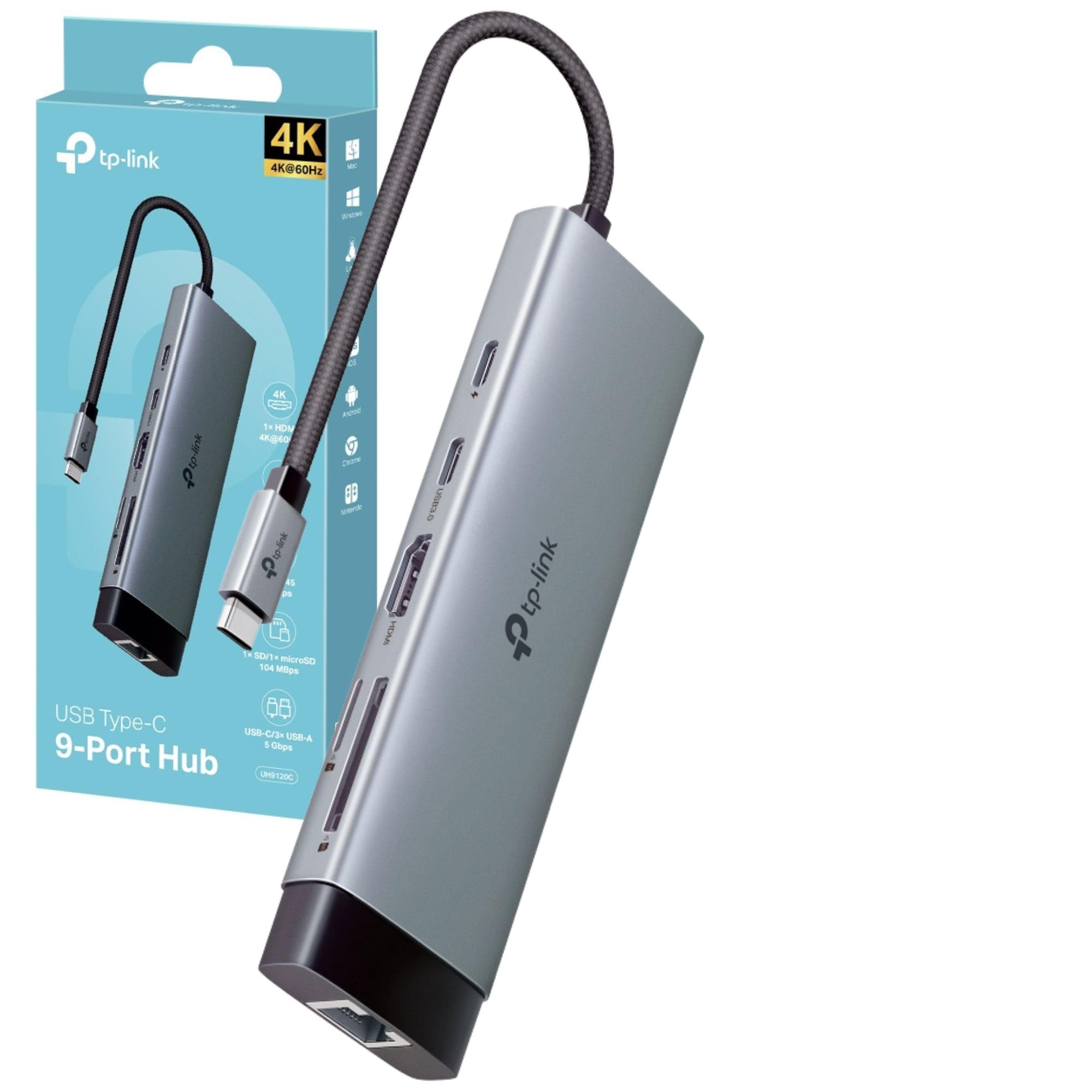
TP-Link UH9120C 9-in-1 USB-C Hub
TP-Link

UH9120C 9-in-1 USB-C Hub

7.8
/ 10
Good

TP-Link's 9-in-1 USB-C hub — most ports in this list. Ethernet, HDMI, multiple USB-A and USB-C, SD/microSD. Larger chassis. For users replacing a full docking station with a portable hub.

Why we love it
  • 9 ports including Ethernet
  • TP-Link networking brand
  • Dock-style functionality
  • Portable vs full dock
Watch out for
  • Premium pricing (£29)
  • Larger chassis
  • Bus-powered limits HDDs
Type
USB-C dock-style
Ports
9 including Ethernet + HDMI
Brand
TP-Link
Price
~£29
Use case
Portable dock
07
Generic USB-C Multiport Adapter (Mid-Range)
Generic

USB-C Multiport Adapter (Mid-Range)

7.7
/ 10
Good

Generic-brand USB-C hub at mid-range price. Similar feature set to Anker/UGREEN equivalents. Pick by current price; verify port config matches your needs.

Why we love it
  • Multiport USB-C
  • Mid-range pricing
  • Multiple SKU options
  • Common port mix
Watch out for
  • Generic brand
  • Variable build quality
  • Bus-powered
Type
USB-C multiport
Brand
Generic
Price
~£22
Use case
Mid-budget
Speed
USB 3.0
08
UGREEN USB-C Hub 10Gbps (Alt SKU)
UGREEN

USB-C Hub 10Gbps (Alt SKU)

7.2
/ 10
Fair

Alternative UGREEN 10Gbps hub — different port config from #2. Same UGREEN 10Gbps quality at a different price point.

Why we love it
  • 10 Gbps speed
  • UGREEN brand
  • Multiport mix
  • Mid-budget
Watch out for
  • Similar to #2 in performance
  • Verify port config
  • Bus-powered
Speed
USB 3.2 Gen 2 (10 Gbps)
Variant
Alt SKU of #2
Brand
UGREEN
Price
~£17
Use case
10 Gbps with different port mix
Best Budget
09
UANTIN USB-C Hub 7-in-1 (4K HDMI Multiport)
UANTIN

USB-C Hub 7-in-1 (4K HDMI Multiport)

7.1
/ 10
Fair

UANTIN 7-in-1 hub at sub-£10. Most-bought generic 7-port USB-C hub on Amazon UK. Build matches the price; fine for occasional use, not heavy daily docking.

Why we love it
  • 7 ports at sub-£10
  • 4K HDMI
  • Multiple SD slots
  • Compact
Watch out for
  • Generic UANTIN brand
  • Lifespan typically 12-18 months
  • Bus-powered
Type
USB-C 7-in-1
Ports
USB-A, HDMI 4K, SD
Brand
UANTIN
Price
Sub-£10
Use case
Budget multiport
10
Generic USB-C Hub (Sub-Budget)
Generic

USB-C Hub (Sub-Budget)

6.7
/ 10
Fair

Cheapest USB-C hub on the list — sub-£6 generic entry. Fine for occasional travel use, not for daily desk setup. Treat as a 6-12 month tool.

Why we love it
  • Sub-£6 cheapest entry
  • Compact for travel
  • Basic USB-A + HDMI
  • Lightweight
Watch out for
  • Generic brand
  • Build matches the price
  • Limited warranty
Type
USB-C basic hub
Price
Sub-£6
Brand
Generic
Use case
Travel / occasional
Lifespan
6-12 months typical
The verdict

Anker USB-C Hub wins on price/build; UGREEN 10 Gbps is the speed pick.

The Anker USB-C Hub takes the top spot because Anker has the longest track record for reliable USB peripherals on Amazon UK. The hub typically has 4-5 ports (USB-A 3.0, HDMI, SD card, USB-C PD pass-through). Strong build, predictable Anker warranty, sub-£10 entry. The default 'add-USB-A-back-to-my-USB-C-laptop' upgrade.

For users wanting USB 3.2 Gen 2 (10 Gbps) speeds, the UGREEN 10Gbps hub is the smarter buy. Most cheaper hubs run at USB 3.0 (5 Gbps) — fine for keyboards and most flash drives but slower for high-speed external SSDs. The 10 Gbps spec matters if you're plugging in NVMe-based external SSDs (Samsung T7 Shield, SanDisk Extreme Pro).

Below the £20 line, the picture is honest: dozens of similar 4-7 port USB-C hubs from Anker, UGREEN, TP-Link and generic brands. They cover the same use cases (USB-A, HDMI 4K, SD, USB-C PD) at similar prices. Pick on current price and review count. Powered hubs (separate power plug) aren't in this list explicitly — for running external HDDs you should add a powered hub like the Anker 7-port USB-A hub, which is a different category.

Frequently asked

Common questions

USB-C or USB-A hub?
Match the port your laptop has. Modern MacBooks and ultrabooks (USB-C only): you need a USB-C hub. Older laptops and desktops (USB-A): you need a USB-A hub. Many USB-C hubs add USB-A ports back to your laptop — turning a single USB-C port into multiple legacy ports.
What's USB Power Delivery (PD) pass-through?
PD pass-through lets you plug your laptop charger into the hub instead of the laptop, charging the laptop while also using the other hub ports. Without PD pass-through, you lose a USB-C port to the charger. For most modern USB-C laptops with only 2 USB-C ports, PD pass-through is essential.
Why does my external hard drive disconnect from the hub?
Bus-powered hubs draw all power from the laptop's USB port. Modern laptop USB ports provide ~900 mA — enough for a keyboard + mouse + USB stick but not enough for multiple external HDDs (which can draw 500-700 mA each). For 2+ HDDs simultaneously, you need a powered hub with a separate wall adapter.
Can I use a USB hub for 4K external monitor?
USB-C hubs with HDMI output support 4K, but most cap at 30 Hz (acceptable for office work, choppy for video/gaming). For 4K @ 60 Hz, you need a hub with DisplayPort 1.4 or HDMI 2.0+ — check the listing carefully. Some 'HDMI 4K' hubs are 4K @ 30 Hz only; the spec sheet usually buries this.
Are powered hubs worth it?
For any setup running 2+ external HDDs, USB-attached printers, or external optical drives — yes. Bus-powered hubs save desk-space and travel but compromise on stability under heavy load. Powered hubs are bigger (separate wall plug) but never drop drives. Most desk-bound users benefit from a powered hub; travel users prefer bus-powered.
BP
About the editor

Best Products UK Editorial Team

Best Products UK is an independent UK product-review aggregator. Our editorial team synthesises hands-on reviews from leading UK consumer publications — Which?, Wired UK, T3, Tom's Guide UK, Trusted Reviews, TechRadar, Good Housekeeping, Expert Reviews, Stuff and others — into clear, ranked top-ten guides for UK shoppers. We do not run a physical test lab. We tell you which products UK reviewers agree on, where they disagree, and which the data says is right for your budget. Our methodology is published openly at /about/#methodology.